
Vivid Seats Broker Portal: Navigation
Order Management: Order Queues
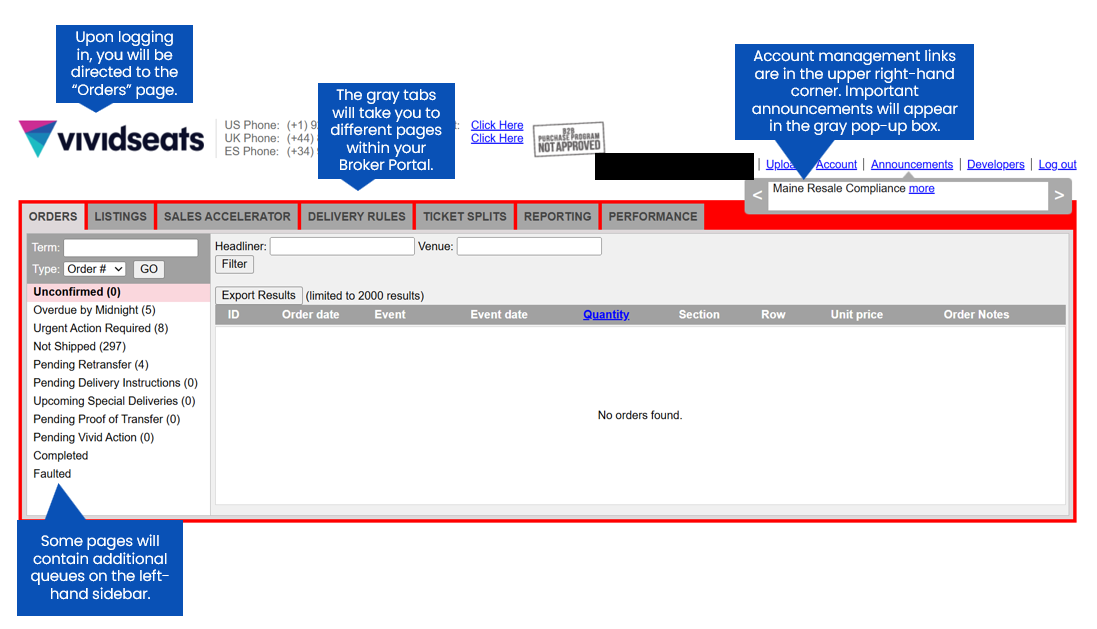
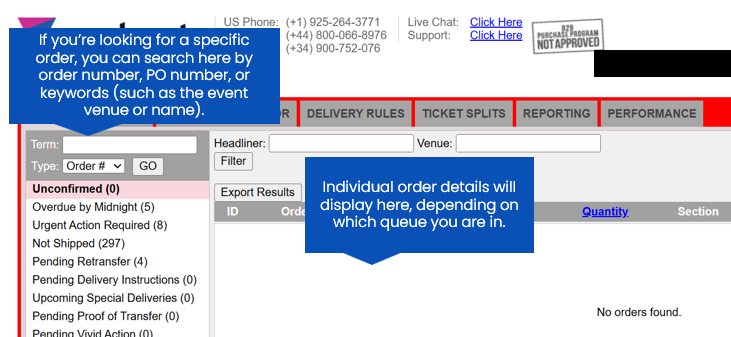
The "Orders" page of the Vivid Seats Broker Portal allows you to manually confirm orders, monitor your in-hand dates, and fulfill orders that were not listed as Instant Downloads. There are a variety of order queues to simplify order management.
Queues:
| Unconfirmed | Orders that have not been auto-accepted. Orders will also appear here between the time that they are placed and then auto-accepted. Some software products may have a 1-5 minute delay when auto-accepting orders. If you are aware of any delays, please refrain from manually processing an order until you are confident that it is necessary. |
| Overdue by Midnight | Orders that will be deemed as overdue and subject to replacement/cancellation if not fulfilled by midnight. |
| Urgent Action Required | Orders that are approaching, on, or past the in-hand date. Near-term Special Delivery orders that are awaiting delivery instructions will also appear here. |
| Not Shipped | Orders that have not been shipped or uploaded. |
| Pending Retransfer | Orders that need to be retransferred to the customer. |
| Pending Delivery Instructions | Special Delivery orders that are awaiting delivery instructions. |
| Upcoming Special Deliveries | Orders set as Special Delivery for upcoming events. This queue makes it easy to view customer names and phone numbers for orders that you have already uploaded delivery instructions for. |
| Pending Proof of Transfer | Orders that have been marked delivered but proof of transfer has not been uploaded. |
| Pending Vivid Action | Orders that have been deferred to Vivid Seats for a shipping label or orders that are experiencing shipping exceptions will appear here. No action is required from the seller. |
| Completed | Orders that have been uploaded or shipped. |
| Faulted | A list of orders that were deemed as seller fault. |