
The Sales Accelerator gives you the opportunity to apply discounts on inventory listed on Vivid Seats. This allows you to easily discount specific inventory without affecting your other listings.
Discounts may be applied in the following ways:
- Targeting Discount: Apply a discount based on a specific event, team, artist, or venue. You may also choose for these discounts to become active during a specific time frame prior to each event.
- Global Discount: Apply a discount on all inventory based that become active during a specified range of time to each event.
Crediting discounts in the Sales Accelerator helps you liquidate last minute inventory, or price competitively to the Vivid Seats market without driving down the market on other exchanges.
You may view, edit, or remove discounts at any time.
Discounts entered into the Sales Accelerator are in addition to your current seller fee.
To create a discount, proceed to your Vivid Seats Broker Portal and click on the "Sales Accelerator" tab. Within that page, you will see a link to create a new discount rule called "Add a new discount rule."

After you click that, determine if you would like to set a global discount, or a targeted discount.
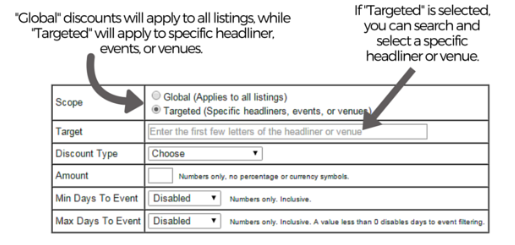
Targeted Discounts
With Targeted Discounts, you are able to target specific headliners, events, or venues.
After choosing "Targeted," type in your target in the search field. This can be the name of an artist, team, or venue. For this example, U2 is chosen as the Target:
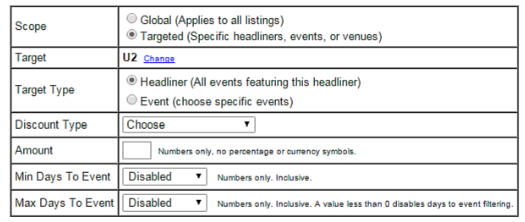
Next, select your Target type.
"Headliner" will discount all inventory with your target.
"Event" will provide you with the option to choose a specific event.
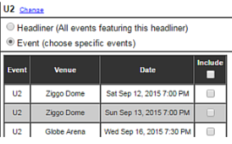
If you wish to set a discount for a specific event, select the event(s).
Once you have selected your target(s), choose your discount type. Discounts may be a "Fixed" amount or a "Percentage."
Enter the amount or percentage that you wish to discount your tickets. In the example below, all U2 tickets will be discounted by 10%. If a specific U2 event was chosen, all tickets for that event will be discounted by 10%:
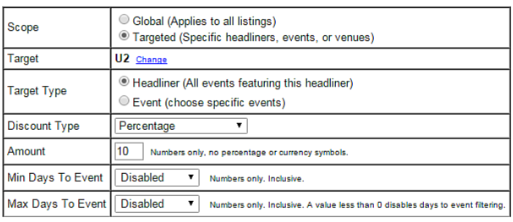
The "Min Days To Event" and "Max Days To Event" options may be used if you wish to discount your tickets during a specific time frame. Leaving both options as "Disabled" would mean that the discount will be applied regardless of the number of days to an event.
"Min Days To Event" represents the number of days to the event that you would like the discount to expire. "0" represents the day of the event, "1" represents the day before the event, and so on.
"Max Days To Event" represents the number of days prior to the event that you would like the discount to start.
In this example, all U2 tickets will be discounted by 10% starting 3 days before the event, up until the day of the event: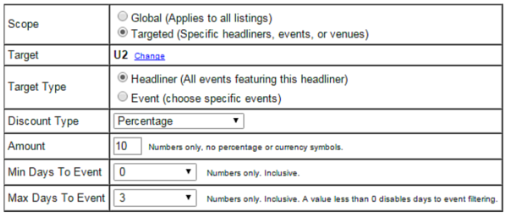
Once you have set your desired time frame for your discount (or none at all if you prefer), click "Save." Once a discount rule has been set, it will be displayed in your Vivid Seats Broker Portal like this:

You may set multiple discounts for the same target by staggering the dates in which they are active.
For example, in addition to the discount rule created in the previous page, you may set an additional rule to discount your target by 5% starting 7 days before each event and ending 4 days before the event - at which point the discount set in the above example will take over, and discount all inventory by 10%.
